[Ubuntu Tip] Change DNS settings in Ubuntu
![[Ubuntu Tip] Change DNS settings in Ubuntu](https://cdn.hashnode.com/res/hashnode/image/upload/v1588496834423/uoMHoMDkm.jpeg)
Tech Addict, Ubuntu Gnu/Linux Fan, Nim/Qt/C++ Developer
You may need to change your DNS settings in Ubuntu for various reason like faster internet or streaming media or safe browsing.
Here is a simple working method you can use, using DNSmasq.
1- Install DNSmasq:
sudo apt-get install dnsmasq
2- Edit DNSmasq Configure file:
sudo gedit /etc/dnsmasq.conf
3- Add your preferred DNS at the end of the file:
in this example I used Google DNS
server=8.8.8.8
server=8.8.4.4
4- Add system hosts file to Network Manager DNSmasq Config:
5- Restart DNSmasq and Network Manager:
sudo service network-manager restart
Flush the DNS Records
Previous methods is enough, but you may need to flush the DNS records in the browser you are using if you had any network problem after changing the DNS.
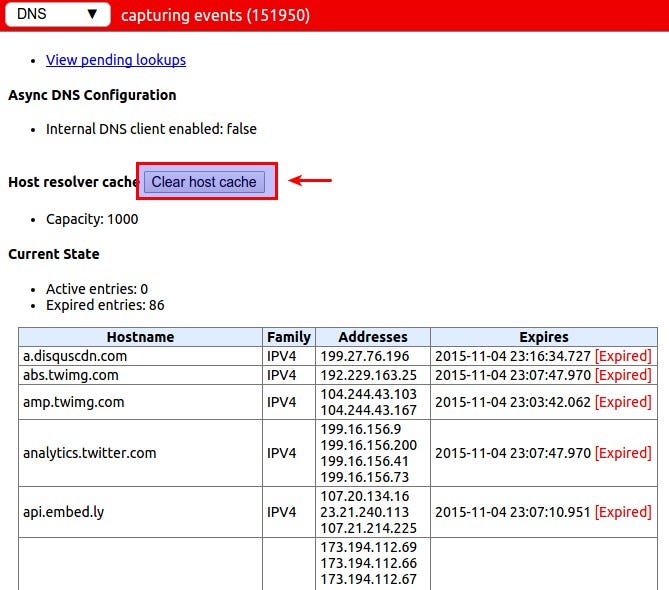
Here how to flush the DNS in Chrome and Chrome based browser like Opera and Vivaldi.
1- Open DNS Settings page in chrome:
chrome://net-internals/#dns
2- Clear Host Cache:
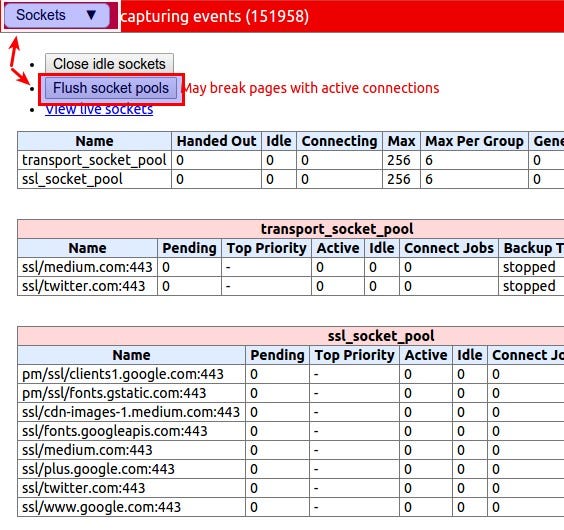
3- Flush Socket Pools
Best DNS servers
Here three best DNS servers you may want to use.
1- Google DNS: [ Support ]
8.8.8.8
8.8.4.4
2- OpenDNS: [ Support ]
208.67.222.222
208.67.220.220
3- Tunlr: [ Support ]
45.33.81.76
45.33.12.13
Test your system to check if its using the preferred DNS:
Ubuntu 15.04 and Above
Apply this command in the terminal:
nmcli dev show | grep DNS | sed 's/\s\s*/\t/g' | cut -f 2</span>
Ubuntu 14.04
- Install nm-tool:
sudo apt-get install nm-tool
- Then Apply this cmd:
nm-tool | grep DNS
 Thank you for your support!